Varies by feature
File formats
Choose HEIF, JPEG, DNG or a RAW + processed photo pair and understand what gets saved.
Prerequisites
- Photos permission granted for saving
- iOS and a RAW-capable lens for DNG or RAW pairs
- Android uses JPEG output
Choose the format and outputs
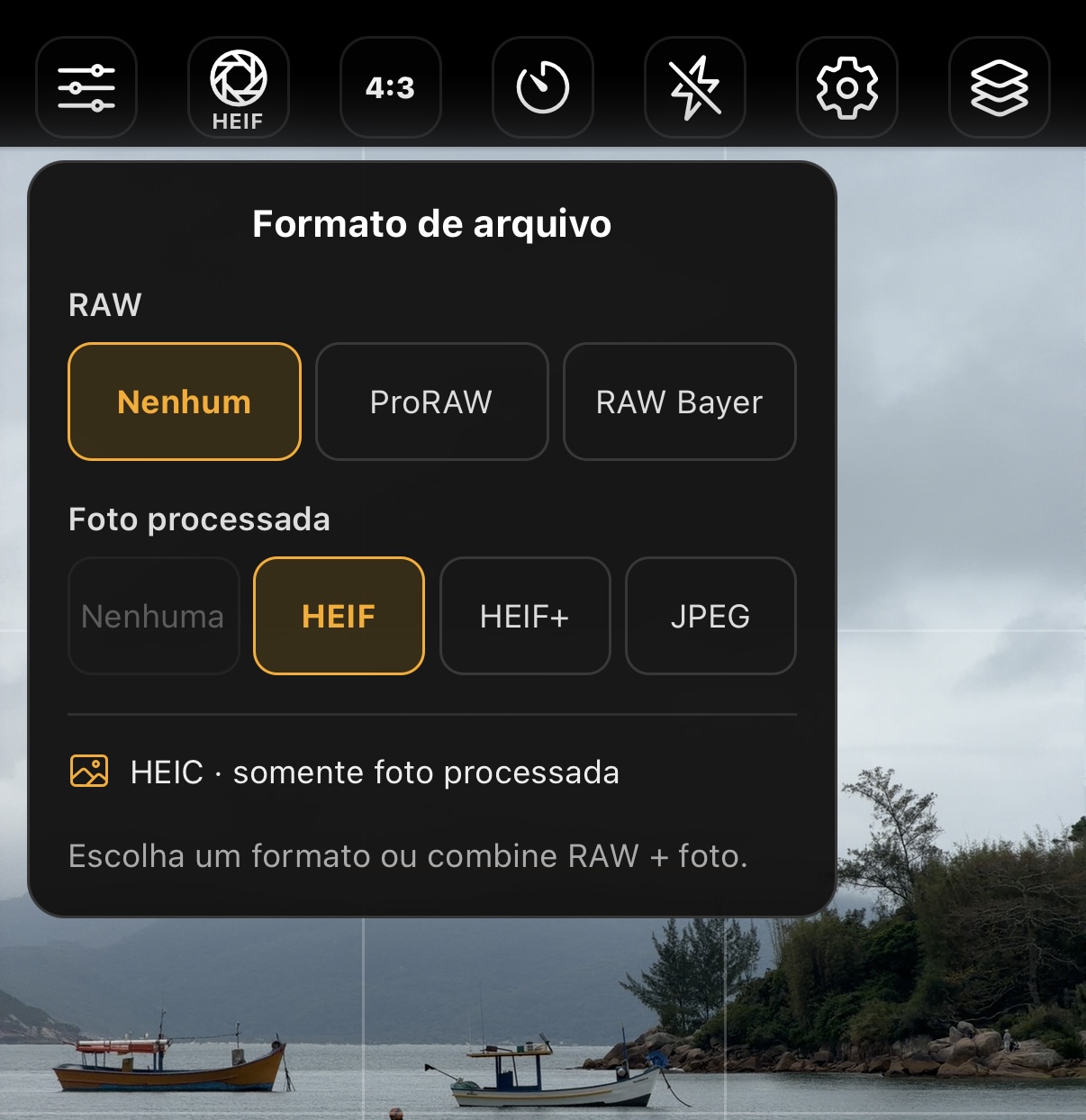
Open File format in the TopBar. The RAW area offers None and the ProRAW and Bayer RAW modes available on the lens; Processed photo offers None and HEIF, HEIF+ or JPEG on iOS. On Android, processed output is JPEG. If the shortcut is missing, add it in Settings → Control bar.
Keep at least one output. To save only DNG, select a RAW mode, then None in Processed photo. To save only HEIF/JPEG, select the processed photo, then None in RAW. The selector does not allow turning off the last output.
- HEIF: processed photo with efficient storage; confirm that the destination accepts .heic.
- JPEG: an option for apps and services that need wider compatibility.
- HEIF+: a photo developed from DNG in Komorebi's native pipeline.
- RAW alone: saves only DNG, using Bayer RAW or ProRAW depending on the lens.
- RAW + processed photo: saves one library item with two original resources, DNG and HEIC/JPEG.
Bayer RAW, ProRAW and zoomNew
ProRAW and Bayer RAW are separate options. The app checks support on the active rear camera and shows each available mode, even if there is only one. Choosing Bayer does not silently substitute ProRAW.
Bayer RAW requires a physical lens at native sensor zoom, without cropping or digital zoom. Selector numbers are relative to the lens system: 0.5×, 1× or 4× may correspond to physical lenses without digital zoom; stops such as 2× or 8× may be crops. Availability depends on the device, not just the displayed number.
Using digital zoom, a virtual camera or an unsupported lens turns Bayer off and re-enables processed output. ProRAW remains conditional on lens capabilities and may allow zoom. To return to Bayer, switch to a compatible physical lens without cropping and select Bayer RAW again.
Both modes allow DNG alone, a HEIF/JPEG pair or HEIF+ development, depending on selected outputs. Photographic Styles affect only the HEIF companion or derivative; the DNG receives no styles.
How the RAW pair works
In an HEIF+ pair, the processed photo comes from custom development and includes your effects. In an HEIF/JPEG pair, processing uses the companion image returned by native capture.
On iOS 27, the app requests the DNG as the pair's original. On earlier versions, Photos controls that choice. A badge or display order in another app does not prove which resources were imported.
- The DNG preserves the sensor area; the processed image follows the chosen aspect ratio.
- In Settings → Capture and files → Megapixels, choose 12, 24 or 48 MP separately for RAW and HEIF/JPEG. Defaults are 48 MP for RAW and 24 MP for HEIF/JPEG. Bayer may be limited to around 12 MP; ProRAW depends on the lens. Smaller photos are never upscaled.
- Size varies with the scene, lens and RAW type; there is no fixed size in MB.
Lens changes and incompatible modes
The selector blocks turning off the last output. When changing lenses, it keeps the chosen RAW mode and processed photo selection while the new session reports its capabilities. Confirming that the mode is unsupported, switching to the front camera or using digital zoom in Bayer turns RAW off and enables the processed photo.
Live Photo and Portrait require RAW to be off. Image Stacking suspends RAW and restores the selection when you leave. HEIF+ pauses during Live Photo, Portrait, stacking or use of a camera without RAW.
Display P3, 10-bit and sharing
iOS HEIC/JPEG exports use a Display P3 ICC profile. Conversion respects the input profile; sensor data in the DNG remains intact. LUTs applied in the WebView work in sRGB, and later conversion to P3 does not recover colors already limited there.
10-bit describes color precision; it does not guarantee an HDR image. When sharing a pair, confirm which resources the destination app exports and check GPS, authorship and tags.